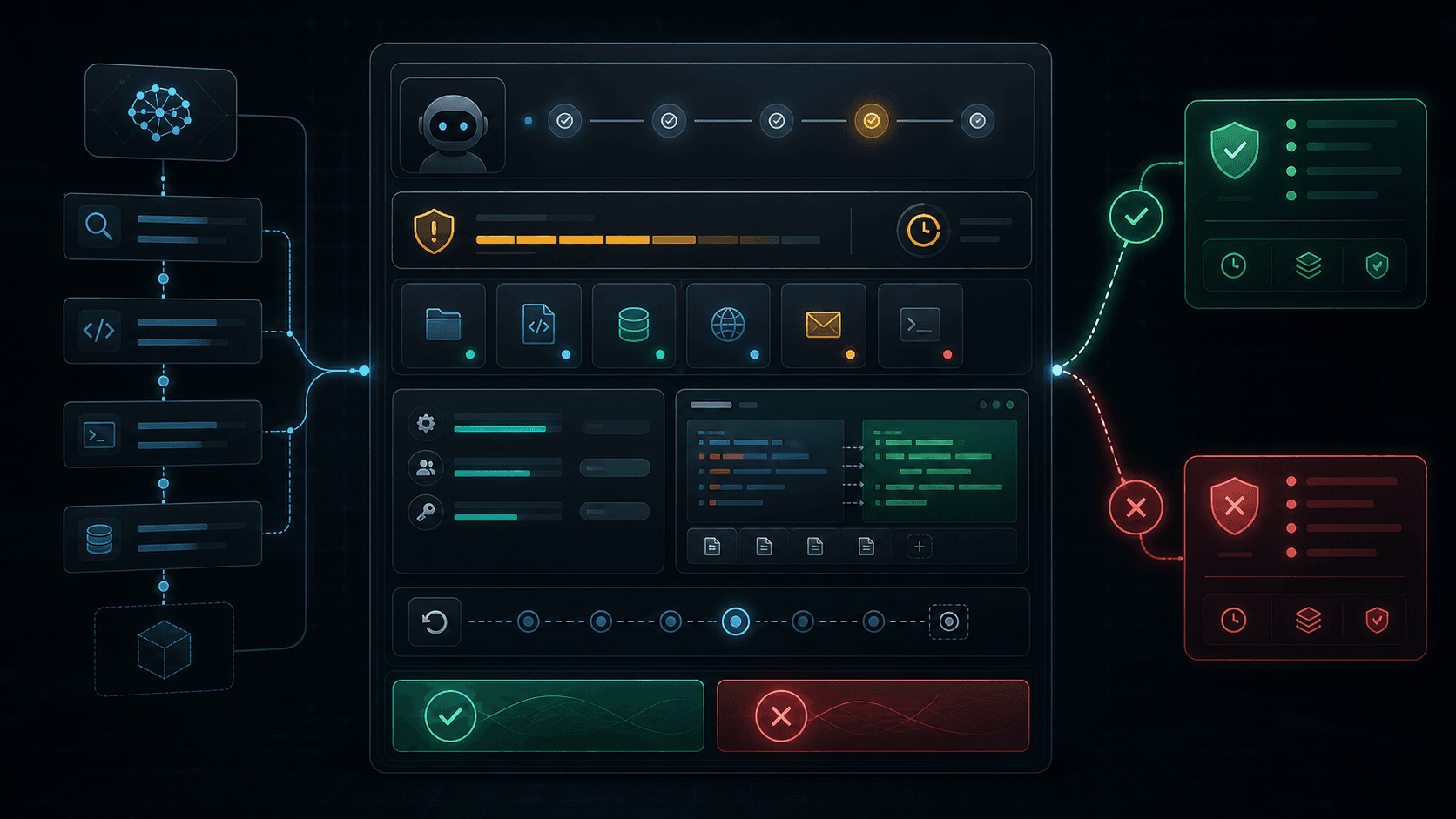
Most agent approval flows are too thin. They ask the user to choose Allow or Deny, but they do not explain what the agent is about to do, why it wants to do it, what could go wrong, how long the permission lasts, or how the action can be reversed.
That model works for low-risk app permissions. It does not work for autonomous agents that can modify files, send messages, call APIs, move money, deploy code, or act on behalf of a person across multiple tools.
Approval UX for agents needs to become a first-class product surface.
Why Allow And Deny Are Not Enough
A human cannot approve an action they do not understand. In agentic systems, the risky part is often hidden in the details:
- The agent is editing three files, but one file contains authentication logic.
- The agent is sending an email, but the recipient is outside the company.
- The agent is asking for filesystem access, but the requested path includes secrets.
- The agent is running a command, but the command can delete or overwrite state.
- The agent wants "temporary" permission, but no expiration is shown.
The approval screen should not merely ask for trust. It should earn trust by making the proposed action legible.
The Approval Card Anatomy
A useful approval card has six parts:
| Area | Purpose |
|---|---|
| Intent | What the agent believes the user asked for |
| Action | The exact operation the agent wants to perform |
| Scope | The resources, tools, paths, recipients, or APIs affected |
| Risk | The severity and reason for that severity |
| Evidence | The diff, preview, dry run, or retrieved context |
| Control | Approve, deny, edit scope, expire, or request more detail |
The card should be designed around the action, not around the model. Users do not need a philosophical explanation of the agent. They need to know what will happen if they click approve.
Example: File Edit Approval
When an agent wants to edit code, the approval should include a diff preview and a scoped permission.
{
  "approval_id": "apr_file_82d1",
  "trace_id": "trc_20260604_21b9",
  "intent": "Fix the auth redirect regression.",
  "requested_action": {
    "type": "file.write",
    "resources": [
      "app/auth/callback/page.tsx",
      "components/auth/AuthProvider.tsx"
    ]
  },
  "risk": {
    "level": "medium",
    "reason": "Changes affect authentication flow."
  },
  "evidence": {
    "preview": "diff",
    "lines_changed": 42,
    "tests_planned": ["npm run lint", "npm test auth"]
  },
  "permission": {
    "scope": "these_files_only",
    "expires_in_seconds": 900
  }
}
The key detail is scope. Approving this request should not grant the agent broad write access to the entire repository. It should grant permission to perform this specific edit, against these specific files, for a short period of time.
Risk Tiers Should Be Explainable
Risk labels are only useful when they explain themselves. A vague "high risk" badge creates anxiety without guidance. The approval card should show both the tier and the reason.
type RiskLevel = "low" | "medium" | "high" | "blocked";

type RiskAssessment = {
  level: RiskLevel;
  reasons: string[];
  mitigations: string[];
};

function assessFileWrite(path: string, content: string): RiskAssessment {
  const reasons: string[] = [];
  const mitigations: string[] = [];

  if (path.includes("auth") || path.includes("payment")) {
    reasons.push("Sensitive application boundary");
    mitigations.push("Require diff review before write");
  }

  if (/process\.env|privateKey|secret/i.test(content)) {
    reasons.push("Potential secret access or credential handling");
    mitigations.push("Block automatic execution");
  }

  if (reasons.length === 0) {
    return {
      level: "low",
      reasons: ["Non-sensitive file path"],
      mitigations: ["Record audit event"]
    };
  }

  return {
    level: reasons.length > 1 ? "high" : "medium",
    reasons,
    mitigations
  };
}
Risk should be computed before the user sees the approval card. The UI can then translate the result into practical controls: require a diff, force a dry run, shorten expiration, or block the action completely.
Example: Email Approval
Sending a message has different risks from editing a file. The approval surface should highlight recipients, destination domain, and exact content preview.
{
  "approval_id": "apr_email_19aa",
  "requested_action": {
    "type": "email.send",
    "to": ["vendor@example.com"],
    "cc": [],
    "subject_preview": "Follow-up on deployment window"
  },
  "risk": {
    "level": "high",
    "reason": "External recipient and irreversible transmission."
  },
  "evidence": {
    "preview": "full_message",
    "contains_sensitive_data": false
  },
  "controls": {
    "allow_edit_before_send": true,
    "require_final_click": true,
    "allow_auto_retry": false
  }
}
For communication actions, approval should be close to the final action. Do not ask the user to approve "sending emails" at the start of a session and then let the agent send later messages invisibly.
Expiring Permissions
Agent permissions should decay. A user may approve one action, one resource, one tool, or one time window. The approval model should make that explicit.
type ApprovalGrant = {
  grantId: string;
  traceId: string;
  action: "file.write" | "email.send" | "command.run" | "api.call";
  resources: string[];
  approvedBy: string;
  createdAt: string;
  expiresAt: string;
  maxUses: number;
  usesRemaining: number;
};

function isGrantValid(grant: ApprovalGrant, resource: string, now: Date) {
  return (
    grant.resources.includes(resource) &&
    new Date(grant.expiresAt) > now &&
    grant.usesRemaining > 0
  );
}
This avoids the most common permission leak in agent products: a single approval accidentally becoming a broad capability.
Diff Previews And Dry Runs
Approval should show evidence whenever possible.
For file operations, show a diff. For commands, show a dry run or command explanation. For API calls, show the exact endpoint and payload summary. For emails, show the message body. For browser actions, show the target page and the form fields that will change.
{
  "action": "command.run",
  "command": "npm run build",
  "risk": "low",
  "dry_run_available": false,
  "side_effects": [
    "Writes build artifacts",
    "Does not modify source files",
    "Does not transmit data"
  ],
  "approval_required": false
}
Not every command needs a human prompt. The product should reserve attention for meaningful risk. Otherwise users learn to click approve mechanically.
Rollback-First Design
Every approval card should answer one quiet question: what happens if this goes wrong?
For reversible actions, include the rollback plan next to the approval. For irreversible actions, make that irreversibility visible.
{
  "requested_action": "file.write",
  "rollback": {
    "available": true,
    "strategy": "restore_snapshot",
    "snapshot_id": "snap_before_auth_fix_044"
  }
}
Rollback is not only a recovery feature. It changes the user's confidence at approval time. A reversible action with a snapshot is easier to approve than an irreversible action with the same apparent scope.
The Approval Event
Approvals should be logged into the same trace as the agent run.
{
  "trace_id": "trc_20260604_21b9",
  "event_type": "approval.resolved",
  "approval_id": "apr_file_82d1",
  "decision": "approved",
  "approved_by": "user_123",
  "scope": {
    "action": "file.write",
    "resources": [
      "app/auth/callback/page.tsx",
      "components/auth/AuthProvider.tsx"
    ]
  },
  "expires_at": "2026-06-04T16:15:00.000Z",
  "rollback_snapshot": "snap_before_auth_fix_044"
}
This event should be visible in the agent observability trace. When something goes wrong, the audit trail should show not only what the agent did, but what the human approved and under which constraints.
A Minimal Approval State Machine
Approval UX becomes easier to reason about when it is modeled as a small state machine.
type ApprovalState =
  | "not_required"
  | "pending"
  | "approved"
  | "denied"
  | "expired"
  | "revoked";

type ApprovalRequest = {
  id: string;
  state: ApprovalState;
  traceId: string;
  action: string;
  resources: string[];
  risk: RiskAssessment;
  createdAt: string;
  expiresAt: string;
};

function canExecuteApproval(request: ApprovalRequest, now: Date) {
  if (request.state !== "approved") return false;
  if (new Date(request.expiresAt) <= now) return false;
  if (request.risk.level === "blocked") return false;
  return true;
}
This keeps execution honest. The agent cannot treat an old approval, denied approval, or blocked risk assessment as permission.
Design Principles
Good approval UX follows a few practical rules:
- Show the action, not just the agent's explanation.
- Limit approval by resource, operation, time, and number of uses.
- Require previews for high-impact changes.
- Make irreversible actions visually distinct.
- Attach every approval to the trace.
- Prefer fewer, higher-quality prompts over constant interruption.
- Let the user narrow scope instead of only approving or denying.
The last point matters. A user may not want to deny the whole task. They may want to approve only one file, remove one recipient, shorten the time window, or ask the agent to produce a safer plan.
Conclusion
Approval UX is the control surface for autonomy.
If the approval prompt is vague, users either over-trust the agent or become numb to constant warnings. If the prompt is precise, scoped, expiring, evidence-backed, and attached to an audit trace, the user can make a real decision.
The future of agent safety will not be only better models or better policies. It will also be better moments where the system pauses, explains itself, and gives the human meaningful control.
Related Research
The Agent Observability Stack: Tracing Intent, Tools, Policy, and Outcomes
Agents become trustworthy when every intent, plan, tool call, policy decision, approval, and outcome can be inspected as one coherent trace.
SecuritySecuring the Agentic Workspace: File System Access API & Sandbox Handshakes
Standardizing the permission handshake and AST-level sanitization routines when granting autonomous browser agents native local directory access via the File System Access API.
A2UIA2UI Part 3: Event Hydration and Execution Security in Generative UI
How do you handle clicks, form entries, and action triggers generated on the fly by an AI? Building a secure event delegation framework that prevents UI injection.