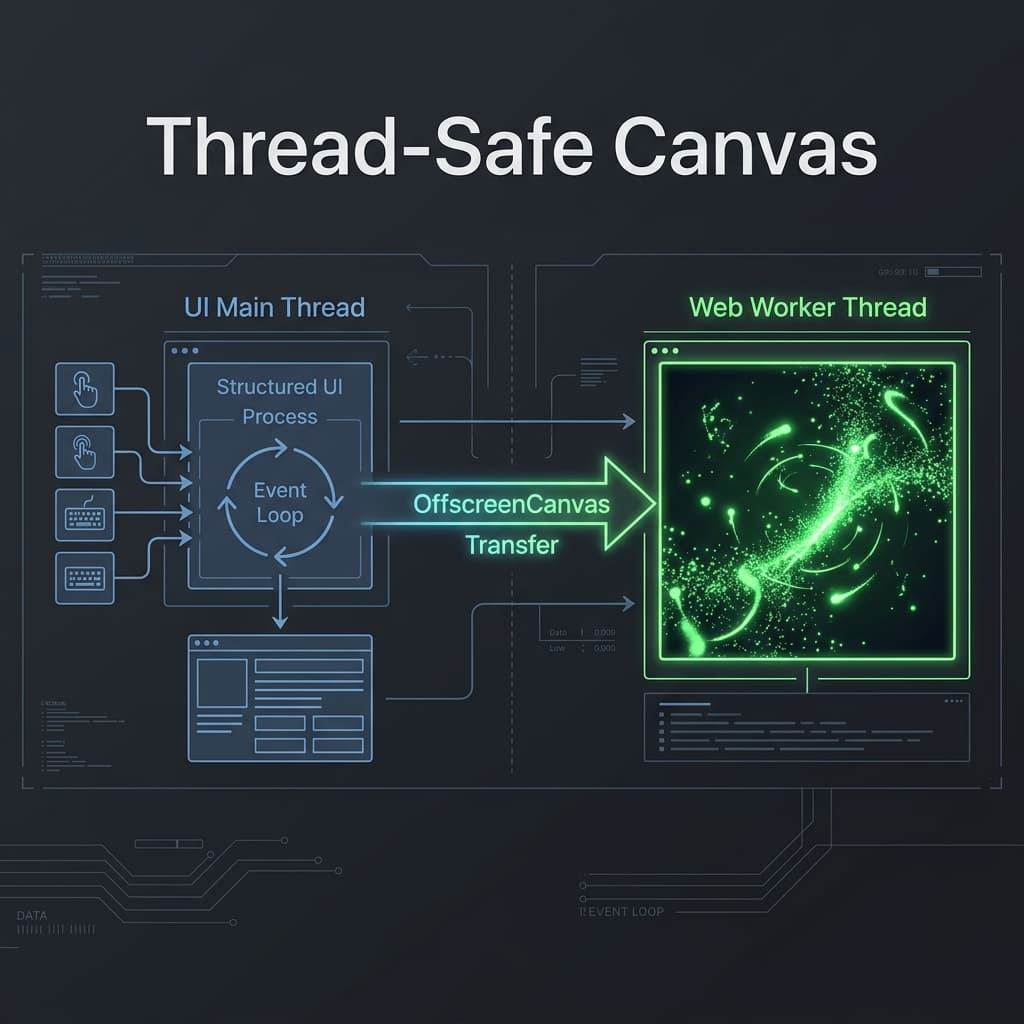
JavaScript is single-threaded. When a user drags a slider, types, or scrolls, those events share the CPU with layout engines and draw loops. If your Canvas is rendering complex visualizations, the calculations block the event loop, causing dropped frames (jank) and laggy input responses.
To solve this, we can decouple rendering from the main thread entirely using OffscreenCanvas and Web Workers.
Below is a live, interactive sandpit demonstrating the performance delta. Switch between the Main Thread and Web Worker modes, simulate UI jank, and watch how the background worker maintains a flawless 60 FPS even when the main thread is completely frozen.
The Main Thread Bottleneck
When executing a standard requestAnimationFrame loop, both the physics calculations (velocity, gravity, collisions) and the actual drawing commands (ctx.beginPath, ctx.arc, ctx.fill) are queued on the main thread.
If this thread is busy processing a layout change, resolving a network request, or handling a heavy React re-render, the canvas frame is delayed. This results in visual stuttering and input latency.
The Solution: OffscreenCanvas
The OffscreenCanvas API allows developers to disconnect a canvas rendering context from the DOM. By calling canvas.transferControlToOffscreen(), we obtain an instance of OffscreenCanvas that can be sent to a Web Worker via postMessage.
Once transferred, all canvas operations take place in the background worker thread. The worker runs its own requestAnimationFrame loop, completely isolated from the UI thread.
Spawning the Worker
In modern Next.js environments, we can spawn a worker cleanly using standard Webpack 5 URL syntax:
// Inside the React component (client-side only)
const canvas = canvasRef.current;
const offscreen = canvas.transferControlToOffscreen();

const worker = new Worker(new URL('./canvas-worker.ts', import.meta.url));
worker.postMessage({ type: 'INIT', data: { canvas: offscreen } }, [offscreen]);
Note the second argument in postMessage: [offscreen]. This is the transfer list, which transfers ownership of the canvas object to the worker rather than copying it, rendering it unusable on the main thread.
The Worker Loop
Inside our Web Worker (canvas-worker.ts), we listen for messages, update our particle physics, and render frames:
let ctx: OffscreenCanvasRenderingContext2D | null = null;

self.onmessage = (e) => {
  const { type, data } = e.data;
  if (type === 'INIT') {
    ctx = data.canvas.getContext('2d');
    requestAnimationFrame(loop);
  }
};

function loop() {
  updatePhysics();
  draw();
  requestAnimationFrame(loop); // Supported natively in Web Workers!
}
Synchronizing Input Events
Since workers cannot access the DOM directly, they cannot listen for mouse or touch events. We must intercept these events on the main thread and delegate them to the worker:
const handleMouseMove = (e) => {
  const rect = canvas.getBoundingClientRect();
  worker.postMessage({
    type: 'MOUSE_MOVE',
    data: {
      x: e.clientX - rect.left,
      y: e.clientY - rect.top,
      active: true
    }
  });
};
By forwarding only raw coordinates, we keep the message payload extremely lightweight, ensuring that the worker receives mouse inputs with sub-millisecond latency.
Architectural Trade-offs
While OffscreenCanvas provides immense performance benefits, it requires a mindset shift:
- State Isolation: Since workers run in a separate context, any state (like particle count or gravity settings) must be explicitly synchronized.
- Text Rendering: Text rendering on an OffscreenCanvas can sometimes be tricky because the worker doesn't have direct access to document fonts or CSS-defined typography.
- Fallback Strategy: For legacy environments, ensure you detect feature support:
TS.SNIPPET
const supportsOffscreen = 'transferControlToOffscreen' in HTMLCanvasElement.prototype;
Conclusion
Thread isolation is the key to building modern, fluid interfaces. By offloading resource-heavy drawing layers to Web Workers, you free up the main thread to focus on what it does best: handling user interaction instantly.